Live avatar.
and voice.
In your feeds.
NZCAM is the very best video call face swap app. Change your face, voice and translate live on all apps, with a simple click using our virtual camera and mic.

How it works
Pick one photo, press Go live, and choose NZCAM as your camera: an AI face swap on your webcam, live on any video call.
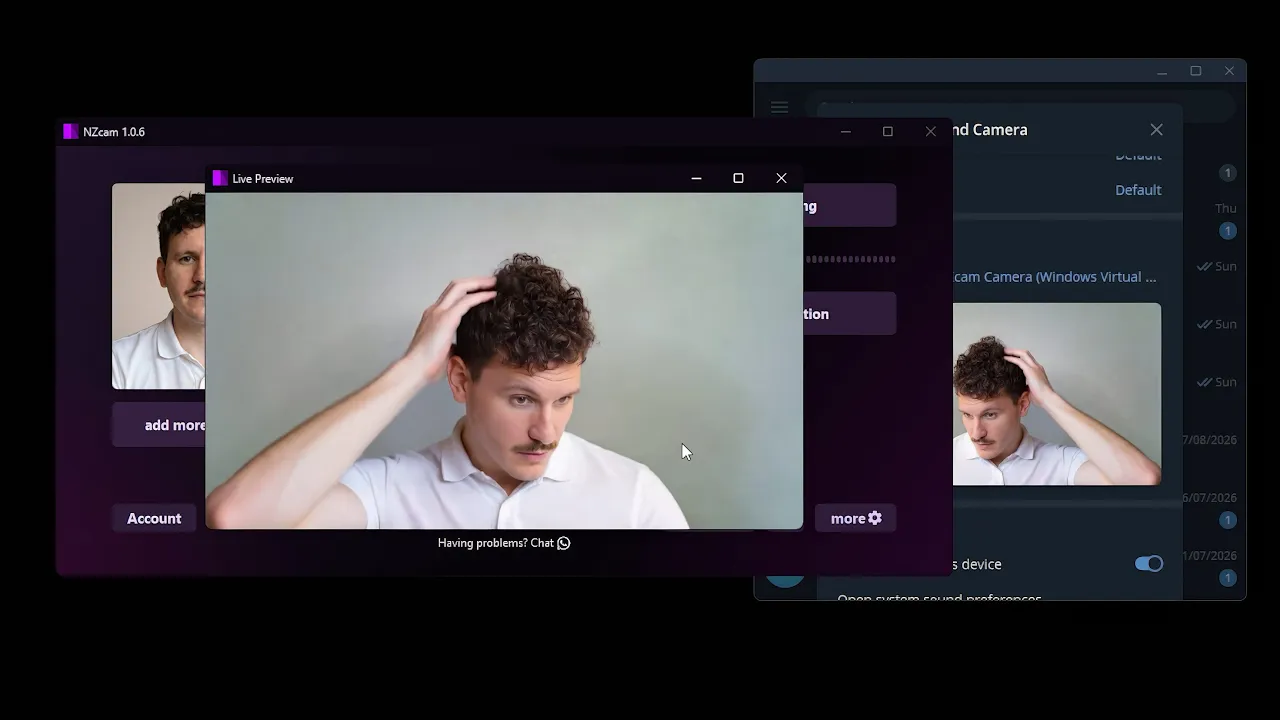
The best live face swap for video calls
For the best video call face swapping, voice cloning and voice translation, NZCAM changes your face, your voice and your language together, in real time.
The best AI face swap
One photo becomes your live face: the best real-time face swap keeps your own blinks and smiles on it.
The best video call face changer
A face changer for video calls and video chat in WhatsApp, Telegram, Zoom, Teams, Discord, Twitch, Facebook, Instagram, YouTube, Line, WeChat, Google Meet, etc.
The best AI voice changer
Clone a voice from a short clip and speak with it live: real-time voice cloning for your calls.
The best live voice translator
Speak your language and the call hears theirs: a real-time voice translator in 63 languages, in a natural voice or your own.
Pricing
NZCAM & NZCAM Lite
One plan, either app.
Expires in a month
Up to 166 min on your PC, or 2 min on our servers
- Everything in NZCAM Lite and NZCAM
- Real-time face swap & voice change
- Virtual camera & microphone for any app
Prefer to buy credits outright?
Every app is free to download and try. Credits are used only while you are live.
Live face swap: questions and answers
What is NZCAM?
NZCAM is the best video call face swap app for desktop: a real-time AI face swap, voice cloning and live voice translation in one. It runs as a virtual camera and a virtual microphone, so one photo becomes a live face swap, a short clip becomes your cloned voice, and your speech is translated as you talk, in any video call, streaming or recording app.
Which apps does the live face swap work in?
It works in all apps: as many apps as let you select a virtual camera or microphone, such as all web apps and all desktop apps like WhatsApp, Telegram, Zoom, Teams, Discord, Twitch, Facebook, Instagram, YouTube, Line, WeChat, Google Meet, etc.
Is the AI face swap really real-time?
Yes. The best live face swap follows your expressions as they happen, and NZCAM is tuned for it: Fast, Balanced and Quality presets, with your own blinks and smiles kept on the new face.
What is the best voice changer for calls?
NZCAM. It clones a voice from a short audio clip and converts your live speech into it, so the best AI voice cloning is also a real-time voice changer: the voice comes out of a virtual microphone every app can pick. Clone on this PC with your own graphics card for free, or on the cloud for credits.
What is the best live voice translator for video calls?
NZCAM is the best voice translator for calls: pick the language you speak and the language they should hear, and it speaks the translation as you talk, a real-time voice translator in a natural voice or your own cloned voice. It recognises 57 spoken languages and speaks 63 languages and variants.
Can I use the face swap and the voice changer at the same time?
Yes. The best face changer and the best AI voice changer run in parallel, so your face and your voice change together in the same live session.
Do I need a powerful PC for an AI face swap?
No. NZCAM runs on your own graphics card or on its cloud engine, which needs no graphics card at all, so the best face swap app for PC runs on any PC, even a small, low-powered laptop. Voice translation runs in the cloud.
Do I need many photos or any training?
No. The best video call face changer, and video chat face changer, needs one source photo (several of the same person give a stronger likeness): no dataset to gather and no training step before you go live.
Is it free to try?
Yes. Every edition is free to download and try, with no sign-up. Plans start at US$5 a week.
Your face, your voice,
live in minutes
Download NZCAM, load a photo and a voice clip, and join your next video call with a live AI face swap and voice changer. No signup to try it.
Get NZCAM